
ADUserSync Service: Active Directory user synchronization
Keep application users aligned with your directory.
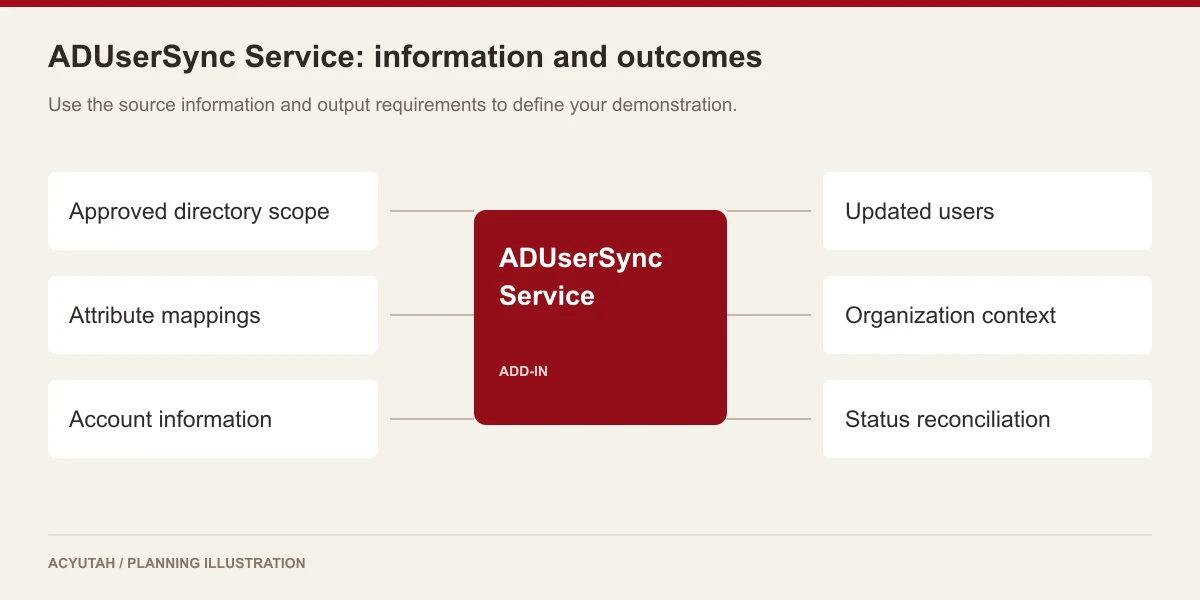
ADUserSync Service provides Active Directory user synchronization for the FineDocs environment. Synchronize identity and organizational attributes, update existing user information and coordinate account-status handling with the configured directory scope.

User information should not drift between systems.
A changed department, manager or employment status can leave application records out of step with the organization. ADUserSync connects directory information with the FineDocs user environment. The service supports user-update processing and comparison with existing active users, helping administrators maintain the relationship between directory identity and application accounts.
Active Directory user synchronization: 6 practical benefits
Identity attributes
Synchronize username, first and last names and email information through the service’s user-update path. Agree the authoritative source and matching rules for each field.
Organizational context
The implementation maps attributes such as department, organizational unit, title, employee identifier, manager and domain. These fields provide context for application administration.
Account-status information
Account status is included in the synchronization data. Define how directory changes should be reflected in the application and which exceptions need administrator review.
Existing-user updates
The service includes update processing for existing users. Test changes to representative accounts before extending the synchronization scope.
Deactivation handling
The implementation compares directory users with existing active application users and includes deactivation processing. Directory filters and source availability must be validated carefully before this behavior is enabled.
Service operation and logs
Run the synchronization as a managed service with operational logging. Agree who monitors failures, reviews unexpected changes and owns recovery procedures.
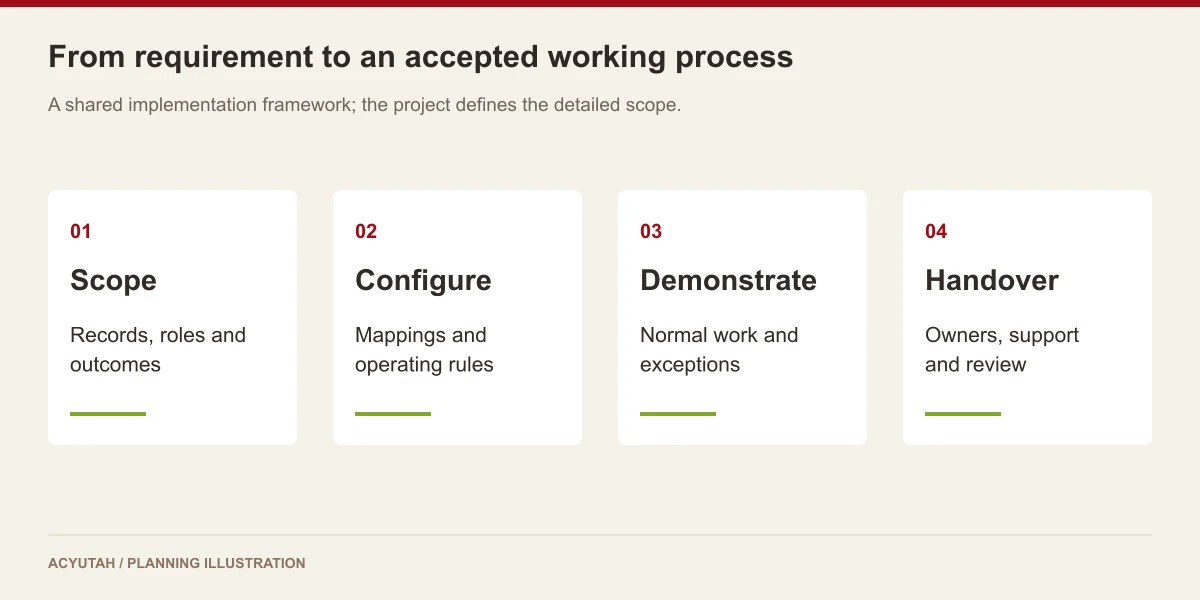
ADUserSync Service in four steps
Scope
Select the approved directory population.
Map
Align identity and organization fields.
Synchronize
Apply configured user updates.
Review
Check account changes and exceptions.
Example: reflecting a department change
When an employee’s directory record changes, the synchronization process can pass the relevant organizational attributes to FineDocs. The application’s access and workflow responsibilities still need their own configured rules. A directory update should therefore be tested alongside the expected application behavior, particularly where department, manager or account-status information affects operational responsibility.
How ADUserSync Service fits your Acyutah solution
ADUserSync is an add-in. It addresses user provisioning and synchronization; it does not by itself establish single sign-on, multi-factor authentication or a connection to every cloud identity provider. Those authentication and integration requirements must be scoped separately.
Evaluating Active Directory user synchronization with your team
Pilot Active Directory user synchronization with a limited, approved user population. Compare names, email addresses, departments and manager information before and after an update. Include a renamed account, an excluded user and a change in account status. Review the application record with the system owner before extending the scope. Active Directory user synchronization should have clear matching rules and an accountable operator, especially when a filter change or an unavailable directory could affect the population returned to the synchronization service.
For the underlying directory model and account context, see Microsoft Active Directory Domain Services overview.
Plan your implementation
Agree directory scope, service-account permissions, attribute mappings, matching rules and account-deactivation behavior. Test excluded users, renamed accounts and unavailable directory responses. Start with a controlled group and review the resulting changes before broadening the population.
Discuss the release, enabled modules and support responsibilities with our implementation team. The product demonstration should reflect the records, users and exceptions that matter to your organization.
Who uses Active Directory user synchronization?
Directory administrators
Active Directory user synchronization depends on an agreed directory population and authoritative attributes. Directory administrators define the relevant scope, access arrangement and the meaning of changes such as a renamed account or department move. They should review the sample returned by the intended filter before synchronization is broadened. A technically valid directory query is useful only when it represents the population the business has approved.
Application administrators
Application administrators use Active Directory user synchronization to maintain corresponding information in the FineDocs environment. They review user matching, field mappings and account-status handling with the directory team. Existing users require particular attention because the service may update records already used in document and process work. The acceptance exercise should show both the incoming directory data and the resulting application record.
Business access owners
Business access owners help distinguish identity updates from the permissions and responsibilities configured in an application. Active Directory user synchronization can update organizational context, but the expected document access or workflow role still needs an agreed rule. A department or manager change should be reviewed with the people responsible for those rules so the organization understands the operational result of a synchronized attribute.
Active Directory user synchronization in a working scenario
Start with a small approved group containing an existing employee, a renamed account and a user outside the intended scope. Record the expected identity and organizational attributes before processing. Active Directory user synchronization should be demonstrated against this known population, with the directory and application administrators reviewing the same records. This reveals ambiguous matching or a scope issue before a broader query affects many application accounts.
Change a representative organizational attribute, such as department or manager, and review the resulting application update. Check the relevant username, name, email and employment-context fields included in the mapping. Active Directory user synchronization addresses user information; access and process responsibilities still depend on application configuration. If a business rule relies on a mapped value, demonstrate the expected application behavior separately with the appropriate owner.
Finally, review the deactivation path and the behavior expected when directory results are incomplete or unavailable. The service includes comparison with existing active users, so scope and source availability deserve careful acceptance attention. Active Directory user synchronization should have a controlled introduction and a clear exception procedure. Authentication, single sign-on and multi-factor authentication are separate requirements and should not be inferred from the presence of a user-synchronization service.
6 acceptance checks for Active Directory user synchronization
1. Approved population
Compare the directory result with a named sample of included and excluded accounts. Confirm that filters and organizational scope represent the intended application population before running a broader synchronization.
2. Account matching
Test existing, renamed and otherwise representative accounts. Review the matching rule with both administrators so a change in identity information does not produce an unexpected application update.
3. Attribute mapping
Compare names, email, department, organizational unit, title and other agreed fields before and after processing. Identify the authoritative source and owner of any field that requires correction.
4. Status changes
Demonstrate the intended account-status and deactivation behavior in a controlled test. Review which user population is compared and what safeguards or operating steps are required before production use.
5. Directory exceptions
Discuss or test the agreed handling of unavailable directory responses and unexpected filtering results. Define who investigates the condition and when processing should be reviewed before continuing.
6. Application responsibilities
Check any access or process rule that depends on synchronized information. Keep identity updates distinct from authentication and permission configuration, and record the relevant owners for each requirement.

Prepare your Active Directory user synchronization rollout
Introduce Active Directory user synchronization with a limited population and a reviewed mapping. Record the expected changes and compare the application outcome before extending the scope. Give administrators an operating guide covering account matching, organizational fields and the deactivation procedure. The handover should identify who approves changes to directory filters and who reviews unusual results.
Maintain Active Directory user synchronization when directory structure, naming conventions or application responsibilities change. Review logs and unexpected account updates with the relevant administrators. Scope changes should be checked against a representative population before production processing. Additional identity platforms or authentication requirements need their own compatibility and integration assessment rather than being treated as automatic extensions of this service.
ADUserSync Service: frequently asked questions
Does Active Directory synchronization mean single sign-on?
No. Synchronization updates user information; authentication and single sign-on are separate capabilities.
Which user details can be mapped?
The service supports names, email, department, organizational unit, title, employee ID, manager, domain and account-status fields.
Can accounts be deactivated?
Account deactivation is supported. Its scope and safeguards must be agreed and tested so directory filtering does not cause unintended account changes.
Does it support every identity provider?
This page describes Active Directory synchronization. Other identity platforms and cloud-directory requirements need compatibility confirmation.
What is a safe first phase for Active Directory user synchronization?
Use a small, approved population with known attributes and expected application results. Include an existing user, a renamed account and an excluded account. Review matching, field changes and status handling with both directory and application administrators before broadening the scope.
Does Active Directory user synchronization determine document permissions?
Synchronization maintains identity and organizational information. Document permissions and workflow responsibilities depend on their application rules. Where a mapped attribute influences those rules, demonstrate the expected outcome with the business access owner and include the relevant configuration in the implementation scope.
See how ADUserSync Service fits your work.
Share your process, document types and user needs with Acyutah.