
Word Add-in for SOP: SOP management Word add-in
Keep SOP authoring close to the document process.
The SOP management Word add-in connects familiar Microsoft Word authoring with the FineDocs document environment. It provides an entry point for SOP-related document actions, helping authors work with the repository rather than treating each local file as an independent procedure.

The authoring tool is only one part of SOP control.
A useful SOP process connects the working document, its identity and its revision history. The Word add-in is intended for the author’s part of that process. FineDocs handles the repository context, while review, approval and learning requirements must be mapped to the relevant configured applications. This separation makes it clear which responsibility belongs to the authoring add-in and which belongs to the wider implementation.
SOP management Word add-in: 6 practical benefits
Word-based SOP work
Use Microsoft Word as the authoring environment for SOP-related document work. The add-in package includes SOP initiation and generation actions.
Repository connection
Connect the authoring session with FineDocs document actions. The configured environment and user permissions determine which records and operations are available.
Check-out and check-in actions
The supplied add-in package exposes check-out, check-in and SOP check-in actions. Confirm the end-to-end behavior against your document template and installed Office version.
Version-related work
Version-history and version check-in actions are represented in the package. Demonstrate how the working copy returns to the repository and becomes part of the document history.
SOP details
SOP-field and detail-handling actions support the connection between the authored document and its identifying information. Template layout and field mapping are implementation-specific.
A connected SOP journey
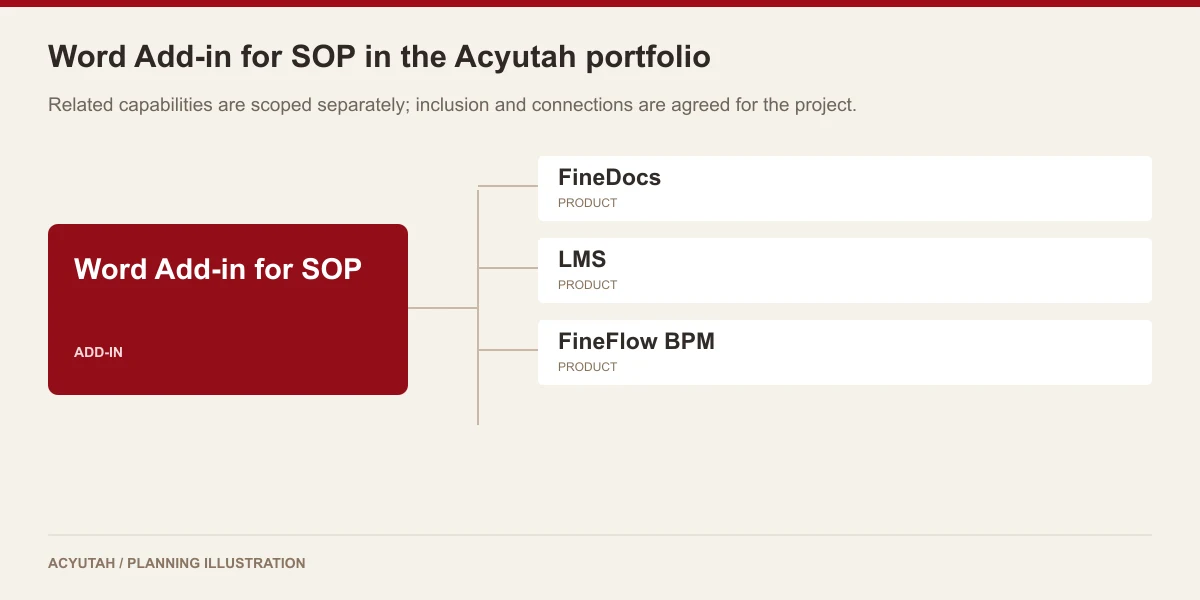
Plan authoring alongside document storage, review responsibilities and training requirements. FineDocs, FineFlow BPM and LMS have separate roles in that wider journey.
Word Add-in for SOP in four steps
Open
Start the approved Word and FineDocs setup.
Author
Prepare or revise the SOP document.
Return
Use the agreed check-in and version process.
Continue
Follow the configured review and training route.
Example: revising an internal procedure
An SOP owner identifies the procedure that needs revision and works in the agreed Word template. The add-in provides the repository-related actions used to return the document to FineDocs. The business then follows its configured review and approval process. If employees need training on the procedure, LMS can support a separately defined assignment and assessment workflow. Automatic transfer or retraining must be established during integration design.
How Word Add-in for SOP fits your Acyutah solution
The Word Add-in for SOP is an optional add-in, not a separate document-management product. FineDocs remains the repository. Workflow approvals, retention and training should be scoped explicitly rather than treated as implicit Word-add-in features.
Evaluating SOP management Word add-in with your team
Evaluate the SOP management Word add-in using a copy of your actual procedure template. Include the document identifier, revision details, headings and fields that authors maintain today. Work through document creation, repository check-out, an edit and check-in with the proposed Office environment. Review how the result appears in the repository and how authors identify its version. A focused SOP management Word add-in demonstration helps distinguish the authoring experience from approval and training steps that belong to the wider FineDocs, FineFlow BPM and LMS solution.
For preparing readable source documents with appropriate structure, see Microsoft guidance on accessible Word documents.
Plan your implementation
Provide the Office version and bitness, sample SOP templates, required header and footer fields, document-numbering conventions and review process. Verify the add-in installation and every repository action in a supported test environment. Confirm the supported add-in release and any template-specific customization before rollout.
Discuss the release, enabled modules and support responsibilities with our implementation team. The product demonstration should reflect the records, users and exceptions that matter to your organization.
Who uses SOP management Word add-in?
Procedure authors
The SOP management Word add-in supports the author’s work with procedure documents in Microsoft Word. Authors need to understand the template, required document fields and the repository actions used during revision. Begin with an actual SOP rather than a blank demonstration file. This lets the team review headings, document identifiers and revision context in the layout people will maintain in everyday work.
Document controllers
Document controllers connect the SOP management Word add-in with the conventions used in FineDocs. They help define document identity, version handling and the handover between authoring and the wider procedure process. Their acceptance review should check what an author creates or revises and how the result appears in the repository. Approval and training responsibilities belong with the relevant configured products and processes.
Workstation and application teams
The technical team prepares the supported workstation and Office environment for the SOP management Word add-in. Compatibility, deployment and template mapping should be confirmed for the proposed version. The handover needs a route for installation questions, repository-access problems and authoring issues. A clear division between workstation support and document administration helps authors get the right assistance without interrupting the procedure-maintenance process.
SOP management Word add-in in a working scenario
Use an existing operating procedure with its document identifier, revision details and business-specific fields. Start the SOP management Word add-in demonstration by reviewing how the agreed template and SOP-related actions fit the author’s workflow. Check the field mapping with the document controller before introducing a revised layout. A familiar procedure makes it easier to identify whether the authoring setup preserves the structure and conventions that the organization needs.
Next, follow a controlled edit. Retrieve the relevant repository document, use the agreed check-out action, make a representative change and check the result back in. Review the available version-history and undo-check-out operations within the proposed configuration. The SOP management Word add-in should be evaluated at this authoring-to-repository handover, where a document’s identity and revision context need to remain understandable to the person maintaining it.
Then map the next stages of the business process. A procedure may need review and approval before employees receive it for training. The SOP management Word add-in supports the authoring part of that journey; FineDocs, FineFlow BPM and LMS have separate responsibilities. Demonstrate any included connections explicitly and record how the approved document reaches the next process. This avoids confusing a convenient Word authoring action with the complete lifecycle of a controlled procedure.

6 acceptance checks for SOP management Word add-in
1. Supported environment
Confirm the Office version, workstation environment and proposed deployment package. Test the relevant authoring actions in that environment before planning installation for the wider author population.
2. Template layout
Open an actual procedure template containing its identifiers, revision fields and headings. Review the mapping and any customization with the document controller so authors know which conventions to maintain.
3. Document creation
Demonstrate the SOP creation or generation actions included in the proposed configuration. Compare the resulting document and its associated details with the agreed template and repository conventions.
4. Revision handover
Follow check-out, a representative edit and check-in with an authorized user. Review the resulting repository version and confirm how the author identifies the document relevant to the current revision task.
5. Exception handling
Include an abandoned edit or another agreed exception in the demonstration. Review the applicable undo-check-out behavior and identify who assists an author when repository access or document handling needs attention.
6. Wider lifecycle
Map approval, release and training requirements to the relevant products. Record any integration work and confirm the handover with the same sample procedure, rather than assuming the Word add-in handles every stage.
Prepare your SOP management Word add-in rollout
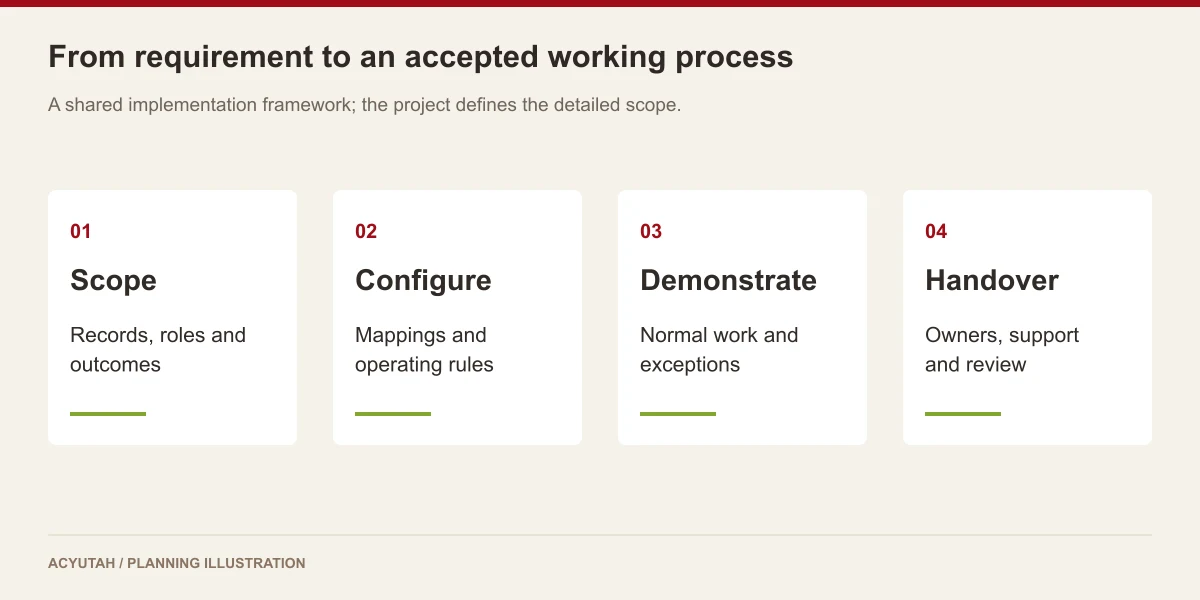
Introduce the SOP management Word add-in with a small author group and a validated template configuration. Train those authors on document identity, repository actions and the expected revision procedure. Give the document controller a clear method for reviewing the resulting documents. The first phase should establish a consistent authoring practice before deployment is expanded to additional templates or departments.
Maintain the SOP management Word add-in alongside changes to Office, workstation configuration and procedure templates. Agree how a proposed update is checked and who supports authors during the transition. The available deployment package informs this offering, while detailed compatibility is confirmed for the project. Any controlled-copy, print, electronic-signature or additional restriction requirement should be demonstrated and separately included where required.
Word Add-in for SOP: frequently asked questions
Is the add-in a replacement for FineDocs?
No. It connects SOP-related Word authoring actions with the FineDocs environment.
Does it manage the whole training lifecycle?
Training assignments, examinations and reports belong to LMS. The integration between authoring, document release and training is a separate requirement.
Which Word environment should we use?
Share your Office version, workstation environment and SOP template. Acyutah will confirm the supported deployment and demonstrate the authoring and repository actions for your proposed configuration.
Can we use our existing SOP layout?
Share the template and required fields so Acyutah can assess the mapping, compatibility and any customization needed.
What should we prepare for an SOP management Word add-in demonstration?
Provide your current SOP template, required document fields, Office environment and an example revision. Identify the author, document controller and next approval or training step. The demonstration can then cover the authoring actions and repository handover using a procedure your team recognizes.
Can the SOP management Word add-in work within a wider procedure process?
The add-in can be assessed as the Word-authoring component of an Acyutah solution. FineDocs supplies the repository, while workflow and learning requirements are mapped to the relevant products. Agree the transfer points, supported configuration and acceptance example for each connection during implementation planning.
See how Word Add-in for SOP fits your work.
Share your process, document types and user needs with Acyutah.